A fun way to teach the layout of a
standard keyboard for Windows
|
|
|

Watch it on Utube!
|
 |
Available in Spanish!Download brochure (pdf) Download free 30-day trial or send an email with your address to sue@ot-care.com  Find
us on Facebook: Find
us on Facebook:
|
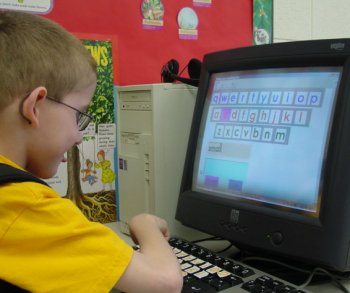
Do you have students for whom handwriting is difficult or laborious, but they seem unable to use a computer keyboard? Do typing tutors leave them frustrated and with feelings of failure? Miss Sue's Keyboard Fun will introduce you to a program designed to teach the layout of a standard computer keyboard to such students. It can be used as students are being introduced to the alphabet and learning to read; or can be used later with students with poor handwriting skills.
Miss Sue's Keyboard Fun starts with matching keys to pictures and sounds, building a memory of letter placement. Initially errors are ignored to provide success quickly; you can grade the task up as the child learns, and build up to spelling words with or without prompts. It has been used successfully with children with cerebral palsy, autism and other developmental disabilities.
It is fully customizable to your particular needs. It can be installed on a MAC or a PC and is available in English and Spanish versions.
Introducing New Touch Screen Applications for Windows or MAC
Learn How to Make The Computer Easier to Access for Students with Disabilities:
Check out other assistive technology items from our partners:
Big KeysKeyboards
Assistive Technology for All Ages
Innovation Management Group for on-screen keyboard and pointing devices, magnigfiers, and word prediction
InfoGrip: Assistive Technology Catalog and on-line Store
 or Mac